


Mary Kay® Skin Analyzer
4.6427.00 Reviews
App Specs
- Version
- 1.5
- Updated On
- License
- Free
- Downloads
- 100,000+
- Developer
- Mary Kay, Inc
- Categories
- Beauty
- Platform
- Android, iOS
Screenshots
 Analysis by AppCompare
I get the most value from a skin-analysis app when I treat it as a consistent check-in, not a verdict on my face. Mary Kay® Skin Analyzer is built around a selfie-based assessment, then connects the concerns it identifies with skincare suggestions. That makes it useful for turning a vague feeling—“my skin looks a little different lately”—into a more organized routine. I’d use its results as a starting point for observation, while remembering that a phone-based analysis is not a medical diagnosis.
That distinction matters in everyday use. Skin can look different depending on lighting, makeup, dryness, or how recently I washed my face. For a fair comparison, I’d take photos under similar conditions and avoid making a big routine change based on one scan. The app is most helpful when it supports a habit of paying attention over time, rather than promising an instant answer.
Your Personal Skin Consultant
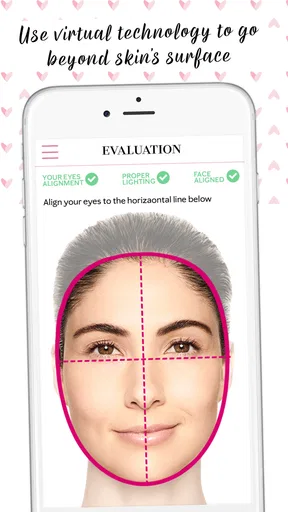
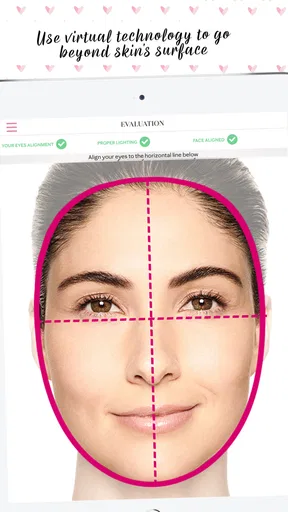
First things first, the Mary Kay® Skin Analyzer isn’t just another beauty app; it’s a full-on skin consultation tool. You start by snapping a selfie, and the app does its magic, analyzing your skin to point out areas that need a little extra love. It’s like having a dermatologist give you a mini assessment without leaving your couch. How cool is that?
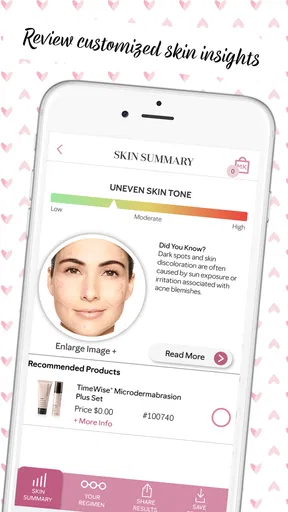
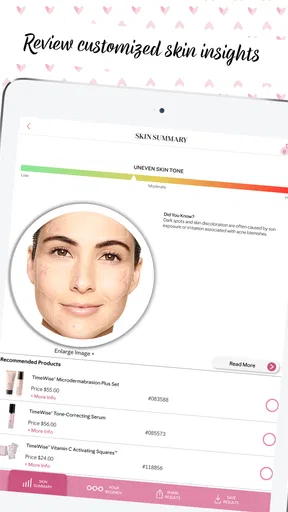
The app looks at various skin concerns like uneven skin tone, wrinkles, and blemishes. With this data, it provides tailored recommendations, which I found super helpful. It’s like the app knows exactly what you need to get that glow!
Easy Navigation and User-Friendly Design
One thing that stood out to me was how intuitive the app is. You don’t need to be a tech whiz to navigate through it. The design is sleek and straightforward, making it easy for anyone to use. All the features are just a tap away, and the interface feels inviting and not overwhelming.
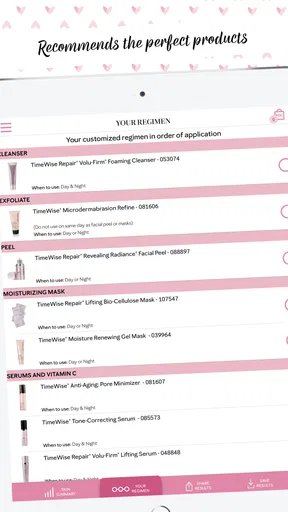
From the home screen, you can easily access your skin analysis history, see product recommendations, and even get tips on how to use them. This ensures you’re not just buying products but also using them the right way.
Make the baseline useful
For a practical first session, I’d keep the routine simple: take the selfie before applying makeup or skincare, use a familiar spot with steady light, and note anything unusual that could affect the result, such as a recent breakout or a day spent outdoors. The point isn’t to stage a perfect portrait; it’s to give future comparisons a consistent reference. If the first result surprises you, I’d repeat the photo under calmer, more typical conditions before changing products.
Worth Reading Before You Choose

EA SPORTS FC Mobile 26 Is a Bigger Football Game, but It Takes Time

Flipboard Shows What News Apps Must Do Beyond the Feed

Switching to Android Auto Means Rethinking Your Driving Routine

Google Calendar Makes a Crowded Week Easier to Manage

Ludo King Makes the Most of the Minutes Between Plans

Baby Panda World Brings Quick Play to Modern Phones, but Its Game Library Feels Busy
A baseline is especially useful if I’m starting to pay attention to one specific concern. Rather than trying to judge everything at once, I’d focus on what the app flags and pair that observation with a small routine change. That makes it easier to tell whether a product or habit seems helpful, although it still cannot prove the cause of a change. Skin naturally varies, and a phone image captures only one moment.
Personalized Product Recommendations
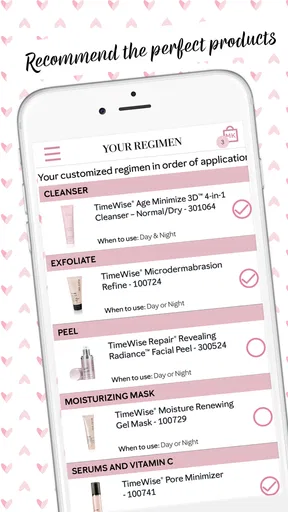
Probably one of the most impressive features is the personalized product recommendations. Based on your skin analysis, the app suggests Mary Kay products tailored to your needs. It even explains why each product is recommended, which I found super informative. You’re not left wondering why a particular moisturizer is suggested; the app breaks it down for you.
And if you’re like me and love knowing more about what you’re putting on your skin, you’ll appreciate the detailed descriptions and ingredient lists. It’s a one-stop-shop for your skincare questions.
I’d read those suggestions as a shortlist to consider, not a shopping checklist. A recommendation can help me understand the kind of need the app has identified, but I’d still compare the ingredient information with what I already use and how my skin tends to react. If I have a known sensitivity, I would not introduce several suggested products at once; adding one new item at a time makes it easier to notice irritation or decide what is actually working.
There is also a real category trade-off here. General beauty and skincare apps may focus on broad routines, product discovery, or advice across many brands. This one is more useful if I want an analysis connected to Mary Kay recommendations and product-use guidance. If I prefer brand-neutral suggestions or already shop elsewhere, a general skincare journal or a dermatologist’s advice may fit better. The tailored approach is a convenience, but it naturally keeps the product conversation within one brand.
Settings and habits worth checking
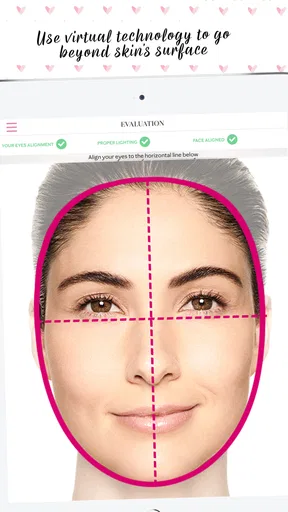
I would check the phone’s camera setup and use the same camera, distance, and angle for repeat scans where possible. Those small choices matter more than taking a large number of pictures. Keep the face clear of hair and avoid dramatic shadows; if the room has mixed lighting, moving to a more evenly lit spot can make the image easier to compare later. These are practical photo habits, not special modes hidden in the app.
It also helps to choose a repeatable moment in the day. For example, I might do a check-in on a quiet evening before applying products, rather than alternating between a morning photo after a rushed commute and a nighttime photo after a full routine. I would not scan every day: frequent snapshots can make normal fluctuations feel like meaningful progress or decline. A steady, occasional comparison is more useful than a stream of inconsistent images.
Faster patterns for busy routines
Once the first analysis is done, I’d make the app part of an existing habit instead of creating a separate skincare project. A monthly reminder, for instance, can prompt a consistent photo and a quick review of recommendations without turning the day into a lengthy consultation. If I’m already checking my routine before restocking products, that is a natural time to revisit the analysis history and see whether my priorities still match what I’m using.
A useful shortcut is to keep the routine itself stable while observing a concern. If I change cleanser, moisturizer, and treatment together, it becomes difficult to tell which change mattered. I’d use the app to help identify what I want to watch, then adjust one part of my routine at a time. This is a simple way to get more value from its history without treating the app as a controlled clinical test.
Imagine noticing that your skin looks dull before an event and opening the app while getting ready. I would not make a same-day purchase decision from that scan. Instead, I’d check whether the concern has appeared in earlier analyses, read the explanation behind any suggestion, and decide whether it matches what I have noticed in ordinary light. That pause is a small but useful safeguard against reacting to one unflattering selfie.
Keeping Track of Your Skin’s Progress
What’s the point of a skincare routine if you can’t see the results, right? The app lets you keep track of your skin’s progress over time. You can compare past analyses to see how your skin is improving, which is both motivating and reassuring. It’s like having your very own skin diary!
This feature gives you tangible evidence of what’s working and what’s not, so you can tweak your routine accordingly. Plus, it’s fun to look back and see how far you’ve come on your skincare journey.
I’d be careful with the word “evidence” here: saved analyses are a record of what the app observed in photos, not proof that a particular product caused a change. For a more grounded progress check, I’d compare similar images and keep brief notes for myself about routine changes or unusual conditions. The history can make patterns easier to notice, but it works best alongside my own observations rather than replacing them.
Where the analysis has limits
Selfie analysis is convenient, but it can be affected by image quality and the conditions around the photo. A blemish may be easier to see one day because of lighting, while a different camera angle can change how texture appears. I would not use the app to assess a new, painful, or persistent skin problem, and I would seek professional medical advice for concerns that need diagnosis or treatment. Beauty guidance and clinical care are not interchangeable.
The recommendations also make the most sense for someone open to Mary Kay products. If I’m committed to a different line, want advice that compares multiple brands, or need help with a complex skin condition, the app may feel limited. It can still help me organize observations, but it is not a substitute for a broad product-comparison resource or a qualified clinician.
Who will get the most from it
I think this is a good fit for someone who wants a low-effort way to begin noticing skin concerns, likes having product suggestions explained, and is comfortable exploring Mary Kay’s range. It may also suit a person who already uses those products and wants a convenient place to revisit guidance and compare their own check-ins. The app is free, so trying its basic workflow does not require paying for the download.
I’d skip it if I wanted an independent medical assessment, a brand-neutral shopping guide, or a detailed manual skincare log with controls I can customize. Someone who dislikes taking face photos may also find the central workflow unappealing. Before installing, it is sensible to check that the phone meets the minimum system requirement: version 6.0 of the operating system or later.
Why You Should Give It a Try
Overall, the Mary Kay® Skin Analyzer is more than just an app; it’s a skincare ally. If you’re serious about improving your skin and want personalized advice without the steep price of professional consultations, this app is definitely worth checking out. It’s like having a personal skincare expert available 24/7.
So go ahead, download it, and start your journey to better skin today. With the Mary Kay Skin Analyzer, you’re not just looking at a screen; you’re looking at the future of personalized skincare.
Practical details and my verdict
Mary Kay, Inc developed this free beauty app, which is rated for Everyone. It was released on January 15, 2019, and its current version is 1.5. It has an average rating of 4.5 from around 1.1K ratings, with 428 reviews and over 100K installs. Those figures suggest that plenty of people have tried it, but they don’t tell me whether its recommendations will suit an individual routine; that depends on how well the brand-focused approach matches what someone wants.
My main recommendation is to use it with modest expectations and a repeatable process: take comparable photos, read suggestions rather than obeying them automatically, and make routine changes gradually. For someone who wants a friendly entry point into tracking visible skin concerns and is interested in Mary Kay products, that is a worthwhile combination. For medical questions or a broader view across brands, I would choose professional advice or a more independent resource instead.
Pros
- Accurate skin analysis results.
- User-friendly interface.
- Comprehensive product recommendations.
- Quick scanning process.
- Detailed skin health insights.
Cons
- Requires stable internet connection.
- Limited to specific skin concerns.
- Occasional app crashes reported.
- Some features behind paywall.
- Not available in all regions.
FAQs for Mary Kay® Skin Analyzer
What is Mary Kay® Skin Analyzer and how does it work?
Mary Kay® Skin Analyzer is a powerful tool designed to assess your skin's condition using your smartphone's camera. It analyzes various aspects such as texture, tone, and hydration levels to provide personalized skincare recommendations. The app uses advanced facial recognition technology to ensure accurate and reliable results tailored to your skin's unique needs.
Is Mary Kay® Skin Analyzer available for both Android and iOS devices?
Yes, Mary Kay® Skin Analyzer is available for download on both Android and iOS platforms. You can find it easily in the Google Play Store for Android users and the Apple App Store for iOS users. Ensure your device meets the required specifications for optimal performance.
How accurate are the skin assessments provided by the app?
The accuracy of the skin assessments in Mary Kay® Skin Analyzer is highly regarded due to its use of advanced facial recognition and analysis technology. However, results may vary based on lighting conditions and camera quality. For best results, use the app in a well-lit environment and follow the instructions carefully.
Do I need to have a Mary Kay consultant to use the app?
While having a Mary Kay consultant can enhance your experience by providing additional personalized advice and product recommendations, it is not necessary to use the app. The app itself offers comprehensive analysis and product suggestions, making it a valuable tool for both new and existing Mary Kay users.
Are there any privacy concerns with using the app?
Mary Kay® Skin Analyzer prioritizes user privacy and data security. The app only uses your camera to capture images for analysis and does not store or share your photos without your consent. Always ensure you download the app from official app stores to avoid security risks and keep your app updated for the latest privacy features.


